Showing posts with label algebra 2. Show all posts

Saturday, May 6, 2023

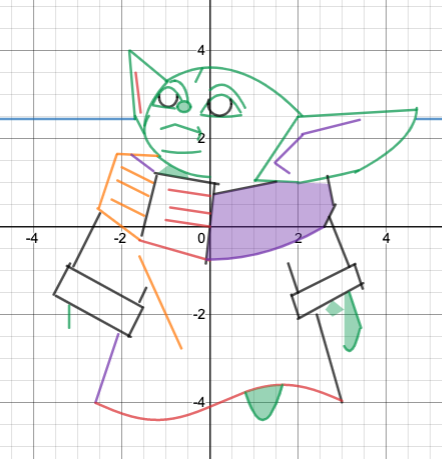
Best Desmos Conics Projects of 2022 - 2023


I'm finally getting around to posting these projects! Here is the link to the assignment and past projects.


Unit Circle Project 2022-2023

 Here are the best projects from 2023 along with the instructions and links to prior years.


Tuesday, December 17, 2019

Conic Sections Projects using Desmos 2019 for Algebra 2 Honors or Pre-Calculus

This is only the second year that I have done Conics Projects on Desmos. (Click here for previous Conics Desmos Project post). This year, I taught conic sections in the first semester, and so I assigned this before Thanksgiving break in case students wanted to work on it. They did a fantastic job!

I think this project is great for several reasons, but mainly:

  • It's open-ended
  • They really learn about domain restrictions and intersections
  • They can use conic sections as well as parent functions, so it ties concepts together
  • They can relate math to something they enjoy
  • It's creative
  • They researched things I haven't taught them yet: inequalities, trig graphs, and lemniscates, for example
This year I added a peer review. I got the idea from my graduate class in Applied Learning. Each student was assigned a peer, and they had to say something that they liked about the project and something that they thought could be improved. They had to send this to me, and then I sent it to the peer, which ensured good quality and no negative comments. Then, the students had to make a change based on their peer's recommendation. Honestly, they gave better critical feedback than I ever could have! (See below for more info on the peer review).

Here are some of their projects.


Examples of how the Final Project was turned in:


Peer Review:

How I set up the peer review. Each student sent their project to the person after the arrow. The person after the arrow then sent their response to me, which I read and then forwarded to the student. 


 Cristi ->Will -> James->Manci-> He ->Lucas ->Bobby  ->Grace  ->Irina-> Leo->dylan  ->zach ->andres ->anthony -> niamh ->ella ->ashley ->zhongxuan ->
blake ->jack ->cristi


A Great Peer Review

Here is my Rubric.


RUBRIC 30 POINTS TOTAL


_____ 4 points Creativity
_____ 3 points Colorful
_____ 5 points Sophistication of conics
_____ 4 points Use of domain restrictions
_____ 5 points Final project with all conics shown prominently is printed in color do not wait till the last minute to do this, nor have poor printer quality and pasted on construction paper
_____ 4 points Equations printed out and pasted next to picture on construction paper (can go off the
            page if necessary.)
______5 peer review turned in on time (-2 if late per day) (graded separately – not part of 30 points)
______5 peer review emailed to me (graded separately - not part of 30 points)
______5 corrections based on peer review


How this project related to my Doctoral study in the Applied Learning Sciences

(Excerpt from my paper)


I believe that the way I teach is an amalgamation of several learning theories: Piaget’s constructivism, Papert’s constructionism, Vygotsky’s social constructivism, and even Behaviorialist theory, when I need to get facts across quickly. However, with my learning project, I am going to focus on Papert’s Constructionism, where “learners make knowledge their own,” (Kafai, 2006 p. 39) and physical objects are important. Using ideas gleaned from Piaget when he worked with him in Geneva, Seymour Papert found it was possible to learn abstract concepts concretely through objects-to-think-with. The objects my students will think with are graphs of conic sections. As of this writing, my students are learning how to graph and find equations of conics, yet I believe that they do not quite have ownership of the concept. It is something they know they need to study to pass the course, but I think that the topic is abstract and separate from them. Through the creative drawing activity, students will be transforming the ideas taught in the classroom and will express them through the website Desmos.com. Similar to LOGO, students will create designs of their choosing by “telling” the computer what to do; in this case, entering equations and playing with them until they are in the “correct spot,” that is, getting it out of their heads and onto paper. Every student can (and is encouraged to) relate conics to something that they enjoy, for example: create a beach scene, a zoo, a hockey arena, or a videogame scene, for example. The hope is that they will appropriate their knowledge to make it their own (Kafia, 2006).


Kafai, Y. B. (2006). Constructionism. In R. K. Sawyer (Ed.), The Cambridge handbook of the learning sciences (1st ed.) (pp. 35–46). Cambridge, England: Cambridge University Press.

Wednesday, May 17, 2017

Find Student-Taught Math Lessons and Riddles on Padlet #StudentTeachingStudents


I blogged about my Ted-Ed Project here, but I used Padlet to create a visually pleasing and easy way to sort the student-made videos. Click below to get a glimpse at all of them. 

Made with Padlet

Tuesday, May 9, 2017

A Good Final Project: Students Creating Videos to Teach Other Students

I am launching my Ted-Ed project #StudentsTeachingStudents, and I think it was pure luck that I had such an amazing group of students to work with this year. Each of my Algebra 2 Honors students created a short video of a concept of their choice that they learned in my class this year. They used Stop Motion, time lapse, iMovie, Explain Everything and Premier among other things. They edited and re-edited so that their videos could be watched by other students who would use their lessons to understand the topic at hand. They dropped their videos in the Ted-Ed “Create a Lesson” format, and came up with multiple choice and free response questions and included links that viewers could click on for enrichment or practice.

Here are a couple of examples.


Here's where to get these videos:

This YouTube channel, #StudentsTeachingStudents, hosts all of their videos. There are more to come. This will not be limited to just math, but right now, it's a start. 

This spreadsheet contains all of their Ted-Ed lessons, though some are still a work in progress.

This is a snapshot of what this student's particular Ted-Ed lesson looks like. Your students can watch the video, answer questions, and then find out more about the topic in the Dig Deeper section. You can customize the lesson how you would like, and you, as the teacher, can see their answers to the questions as well.

Dig Deeper example
Multiple Choice example - will tell you if you are correct.
Feel free to use these videos or lessons to help your students who were absent or who want enrichment or if you would like to flip your classroom. 

Also, if you would like to add to the library, no matter what your discipline is, please email me at lisa.winer@saintandrews.net.

Want to do this project with your students? Here are some resources:


  • What Makes a Good Student Taught Lesson? I created this, but I must thank Rushton Hurley, of Next Vista For Learning, who happened to be running a contest just as my students were making the videos. He helped me a lot with copyright issues (students should only use creative commons music, etc.), citations, and he has a great eye for how to make a lesson better, i.e., hold a slide for a few seconds if it has a formula on it. 
  • Form 1:  Students fill this out before they have finished their lesson. You may need to copy this and make it your own. I had students upload a picture of their outline, but I think you can only do that for your own Google group. It is KEY to getting students to commit to their outline and write it out - a script, if you will - so that they don't waste time shooting a video that you won't accept.
  • Grading Rubric - again thanks to Rushton for his guidelines, which helped me to format mine. 

Here is a little history on the project. 

A number of years ago, I went to the Anja S. Greer Conference on Mathematics and Technology at Philips Exeter Academy. This conference is phenomenal - I've been twice and would love to go back again. Alan November was a keynote speaker and spoke about students creating videos to help other students learn. It stuck with me in the back of my mind, but it seemed like a lot of work. I was right.

I am the faculty sponsor of a math club, and for a few years, I suggested that students create teaching videos instead of peer tutoring for community service. No one did.

Then last year, I saw an application for the Ted-Ed Innovative Educator (TIE), Cohort Three, and I decided to apply. I filled out everything very naturally, and then the question came...what project would you like to pursue if you became a TIE? In the back of my mind, I always envisioned students learning from other students. Even though it had been a few years and I hadn't done anything with my own students, I decided it was something I had really wanted to do, and the words flowed. 

I got the invite to be a TIE, and now I actually was nervous...this sounded so hard! But we had monthly video meetings and an amazing get-together, and over the course of about a year, the project evolved. I can't even tell you how every video call changed just one bit of what I wanted to do. And the Stop Motion workshop at Ted-Ed was mind-blowing...this never would have even been in my mind in the past. Almost one year and 12 one-hour conversations later,  here we are.  Special thanks to Sting and Lisa, from Ted-Ed, who helped me tremendously with my vision. 

It's not been easy for me nor for the kids. Students are used to turning in a project and being done, not being emailed half a dozen times to fix this or that. But I want their work to be accurate, and I want them to be proud.

I have a student who is fact-checking for me for community service. He told me that he wishes these videos were available to him when he was in my class - that they were so helpful. I've shown a couple of the videos to my classes and it's neat to see the students interested in the topic, knowing that their peers made it, and it's also great to see the sense of pride that comes across the student who made the video.

I'm really excited about this project, and I ask you to join me in having your students create videos for each other, and maybe even for the world.

Saturday, August 15, 2015

Three MUST USE online tools for Formative Assessment

Some buzz words I've been hearing lately are "formative" vs. "summative" assessment. It's taken me some time to wrap my head around them, but I think, for me at least, I've finally gotten the idea. The website from the Eberly Center of Teaching Excellence and Educational Innovation really sums it up well. In a nutshell, here's what it says:

Formative assessment monitors student learning and is low stakes...so it has little to no point value. It is a way to provide feedback to teachers to improve how they teach and to students to improve how they learn.

Summative assessment evaluates student learning and is high stakes, so it has a high point value. An example would be a midterm exam or a unit test.

Now that I am teaching in a block schedule, I need to be able to see how my students are doing before moving on to the next concept. I am used to (for 25 years!) teaching, students doing homework and reflecting, and then, very generally, reviewing with a warm-up and adding to it or moving on. But now, I may need to teach two major concepts in a day, or I will not nearly get through enough concepts.

So what I am going to try is to do some online formative assessment activities that also "change things up" for kids during block. What I mean is, I am going to break the block up into several mini lessons using these online tools: Desmos, Kahoot!, Formative.

The first one is an activity builder from Desmos. 

Activity Builders just came out in August, and I was lucky enough to be in a Desmos workshop at Twitter Math Camp, where we played with this incredible DIY tool. It is absolutely AWESOME!!! It was so cool to work with Michael Fenton, and I got a little starstruck shaking the hand of founder and CEO Eli Luberoff.

Here is what one activity I made looks like from the teacher screen...students will answer one question at a time.

There are three screens you can put into the Activity Builder: (See directions here: https://teacher.desmos.com/activitybuilder)

  • A Graph Screen: if, for example, you ask students to graph a line that contains two particular points, you can look at the teacher screen and see that all of the graphs are in alignment (YES! They get it!) or if there are a few students struggling.
  • A Question Screen: you can ask a question, import a graph if you want students to base it off of one, and there is a place to check whether or not students can see any other student's responses...only 3 student answers will show up at a time, which is great because then students won't just copy an answer--if all were there, they might not even do the problem. But a selection of 3 is nice!
  • A Text Screen: This is just to tell them what the activity is or to say it ended, or you could even give them instructions or a formula on it. 
Then you can mix and match as necessary...by the way, saying mix and match, if you haven't tried Desmos Polygraph, you ARE missing out. And now, you can make your own! My friend made one at TMC for Calculus, and it was SO COOL! And you MUST try it with Kittens!


The second one is Kahoot!

I had heard of Kahoot! before, but I didn't see it in action till Twitter Math Camp, when @jreulbach showed it as a My Favorite. It was really fun and competitive, and is based on getting high scores for being both correct and fast...most of my students enjoy competition, and for the ones that do not, it does not have to be played everyday. Also, if I'm not mistaken, only the first few student names are shown, so if students don't do well, I don't think it shows their score. It's a nice, quick change of pace that I know I will use to transition during the 90 minute block.

From jlavely64's Kahoot on blog.getkahoot.com

Here's one I made that I am using as a Precalculus slope warm-up. Rather than review on paper, students do it while playing an exciting game...aka "learning without even trying." I love that you can go to youtube and pick a song and video to play while kids are putting in the code, and then you get to add ridiculous pictures that make me laugh, like the one below--lots of room for pictures (so that also means graphs) on this one.

The third one is Formative.

And finally, I just learned about formative from Melanie at her blog When Life Hands You Lemmas (love that name). Please look at her blog, as she explains it really well, but you can assign a quick Do Now or Exit Ticket or Show Your Work, and you can see what ALL of the kids are writing/typing/drawing at once (i.e., LIVE RESULTS) on YOUR computer! 

Or you can import your own document, and it will look like this, and they touch the box and can type in it...


You can also import videos! AND you give them the right answers so they can check. AND you can write feedback for each student OR each question! It's pretty unbelievable. 

I can see using it these tools every single day in one of four different ways: 


I hope you like these as much as I do...they are all very user friendly, which means you can make them quickly...and use them from year to year and class to class. They are all SO EASY!

One more thing...if you haven't seen Sarah's blog (if you haven't, do you live under a rock?? JKJK). Rather than blog once a day for 180 days, she is going to tweet a picture out each day, and she invited others to do it. She will use #teach180 (see her pic, below) and she asked if anyone else wants to join...why not?? I learn pretty much everything now from MTBoS...would love to learn from you as well. Let's do it!

~Lisa

Tuesday, May 5, 2015

The Unit Circle of Life

Math~~~~~~~~~~~~~~~~~~~~~~~~~~~~~~~~~~~~~~~~

Our math department is divided. Some like teaching the trig ratios with the Unit Circle, some don't. Since I hate  conflict, I teach both methods--one where students will draw a triangle in a quadrant and use what they know about 30-60-90 or 45-45-90 triangles to solve, and one where they learn the first quadrant of the unit circle and then reflect into other quadrants to get the answer.

For years, I have assigned a unit circle project, where students design a unit circle to wear or bring with them all day...the crazier, the better. I give bonus points to the top 3. Some of my favorites have involved printer tattoos that students wear, Shrinky Dink jewelry, Unit Circle Togas...so many more...

But one day earlier in the year I came across Unit Circle Art, a blog by Miss Rudolph. I loved her guidelines and rubric, and I used it in my Pre-Calculus and Algebra 2 Honors classes, and I have never been more pleased with the results. So this year, students were told not to use pre-made circles...that was a game changer. In the past, I have gotten some very lame projects where students cut out unit circles and paste them on circular shapes. I also said that they could not use the site http://www.embeddedmath.com to have a pre-made circle. So students worked really hard (for the most part...and if not, their grades suffered.) Here are some of the best ones.


Coolest thing ever!!


The Unit Circle of Life!


The rules were: Do not use a circle to begin with, but you may draw a circle. You must include degrees, radians, sine, cosine, and tangent of each special angle. You may not use a pre-drawn unit circle. According to the blog mentioned before which I pinned on Pinterest here: unit circle project, and I used Miss Rudolph's rubric exactly.

VERTICAL TEACHING:
I have been fortunate enough to have a new classroom since spring break, where 3 walls are wallpapered with white board paper. I tried to think how I could do something different after teaching the unit circle that would involve students going to the board. On the fly (usually the best way it works--organically), I asked students to go to the board in pairs, each having a different marker. Here were the directions:

partner 1: draw a circle
partner 2: draw the lines
partner 1: label quadrant 1 in degrees
partner 2: label quadrant 2 in degrees
continue for quadrants 3 and 4 alternating, and then continue for radians, (cosx,sinx) and tanx

The kids were definitely talking it through...it was a million times better than when I have had them fill in the unit circle on their own in the past...they loved drawing it on the board, and they helped each other and talked it out. Students that were confused had a partner to help them. If a pair was stuck, they could look at what another pair was doing.


Geek of the Week competition

My students love vying for Geek of the Week, and they asked to see who could draw the unit circle fastest...of course we had to use the Theme from Rocky...I got this idea from a blog but I can't find it...if you know where I got it from, please let me know so I can give credit to the owner!


Play~~~~~~~~~~~~~~~~~~~~~~~~~~~~~~~~~~~~~~~~

Mu Alpha Theta States was so much fun...the poster competition was "Math and Movies." Seven girls worked so hard to create this poster...some stayed up all night, in fact! We did not win, but they definitely won in my eyes! It's a combination of Mean Girls and Good Will Hunting and DaVinci Code.


Eat~~~~~~~~~~~~~~~~~~~~~~~~~~~~~~~~~~~~~~~~

I was told by family members that this was the best dessert ever, so here is the recipe of Flourless Chocolate Cake by King Arthur...very rich and decadent!


~Lisa